> For the complete documentation index, see [llms.txt](https://www.center.daxium-air.com/llms.txt). Markdown versions of documentation pages are available by appending `.md` to page URLs; this page is available as [Markdown](https://www.center.daxium-air.com/news/august-2026/summary-layout.md).
# Read any submission at a glance with the summary layout
The summary layout condenses one submission onto a single page, and it is the first place in Daxium-Air where you can surface data from a submission's parent relations.
**Published on August 5, 2026**
**New feature: the summary layout.**
A form that captures everything is a good form. It is also a long one, and once the submission comes back from the field, the information you need to act on it sits buried among dozens of fields. The summary layout gives you a second, condensed view of that same submission: one page, showing only what you choose to expose.
**What is it?**
A dedicated builder, opened from the form editor with the "Summary layout" button. Drag the fields and metadata that matter into sections, and leave the rest of the form untouched. A section holds at most two columns, so the result stays readable on a phone as well as on a screen.
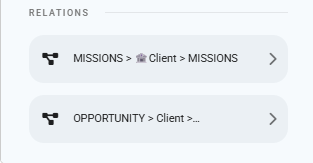
**Parent relations, finally within reach.** This is the part we expect to change the most for you. In the standard form editor, a submission can show its own fields and reach down into its children, but the submissions it belongs to, its client, its site, its contract, stay out of reach. The summary layout lifts that limit: parent relations appear in the metadata selector, so the data of a submission's parent sits right on the page, next to the submission's own fields. The context someone needs in order to decide something no longer lives one or two clicks away.
**Reach into related forms as well.** Click the arrow to the right of a relation field to browse into the related form and pick fields from there.
**Customize what each section shows.** Rename a field for the summary only, give it half or full width, and apply a visibility condition so a section appears only when it is relevant. The same field can appear more than once, in different sections.
**Turn it on where you need it.** When you activate a summary layout, you choose the platforms it applies to: web, mobile, or both. Every submission of that form then opens in the summary layout, with a button to switch back to the standard view. You can also save without activating, and keep working on the draft.
Available on: **Web**, **iOS**, **Android**
{% hint style="info" %}
Learn more in the [Summary Layout](https://www.center.daxium-air.com/user-documentation/build/building-forms/summary-layout) documentation.
{% endhint %}
---
# Agent Instructions
This documentation is published with GitBook. GitBook is the documentation platform designed so that both humans and AI agents can read, navigate, and reason over technical content effectively. Learn more at gitbook.com.
## Querying This Documentation
If you need additional information that is not directly available in this page, you can query the documentation by asking a question.
Perform an HTTP GET request on the following URL with the `ask` and `goal` query parameters:
```
GET https://www.center.daxium-air.com/news/august-2026/summary-layout.md?ask=&goal=
```
`ask` is the immediate question: it should be specific, self-contained, and written in natural language.
`goal` is what the user is ultimately trying to achieve, the reason they need the answer. Sharing it helps GitBook give you a better, more relevant answer. A goal is most helpful when it describes the outcome the user wants rather than restating the question. For example, with `ask=how do I create an API token`, a goal like `automate deployments from our CI pipeline` lets GitBook tailor the answer to that use case.
The response will contain a direct answer to the question and relevant excerpts and sources from the documentation.
Use this mechanism when the answer is not explicitly present in the current page, you need clarification or additional context, or you want to retrieve related documentation sections.