> For the complete documentation index, see [llms.txt](https://www.center.daxium-air.com/llms.txt). Markdown versions of documentation pages are available by appending `.md` to page URLs; this page is available as [Markdown](https://www.center.daxium-air.com/news/october-2026/pdf-plan-view.md).
# Place your submissions on a plan with the PDF plan view
Display the child submissions of a relation field as pins on a floor plan, a site map or a diagram, on the web and on mobile.
**Published on October 21, 2026**
**New feature: the plan view shows child submissions where they belong, on a plan.**
Building inspections, snag lists, maintenance rounds, site visits: a lot of field work is tied to a physical location. In a list, "Room 204, left wall" only works if everyone reads it the same way.
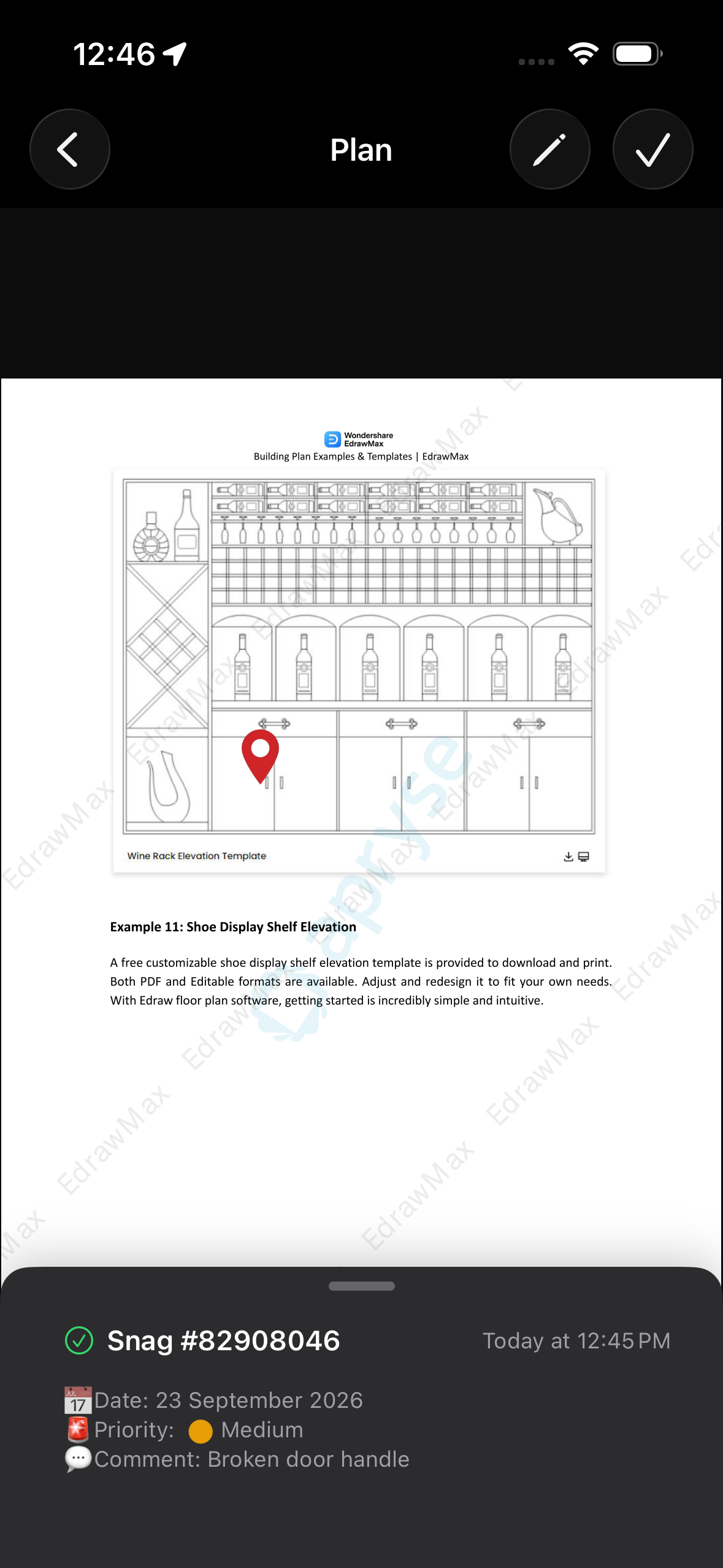
With the plan view, a relation field displays its child submissions as pins on a plan: a floor plan, a site map, an installation diagram. Field users find each item where it physically is, and add new ones by tapping the right spot.
**1. Turn it on in the relation field.** In the form builder, tick **Plan view** in the settings of a relation field. The option needs **Creation** to be ticked, and is not available on a countable relation.
**2. Add your plan.** On mobile, tap **Add a plan**, then reuse a recently used plan, pick a PDF from the device, or photograph a paper plan, which is converted to a PDF automatically. On the web, drop or browse a file (PDF, JPEG, PNG, GIF or TIFF, up to 80 MB) and give it a name.
**3. Place pins and link submissions.** Switch to edit mode and place a pin or draw a shape (line, ellipse, freehand drawing, image). Then attach it to an existing child submission, or create a new one on the spot: it is linked to the pin automatically.
**4. Find everything at a glance.** Pins stay anchored to their spot while you zoom and pan. On mobile, tap a pin to preview its submission. On the web, hover a shape to see who created the submission and its title, and open the side panel to list every submission attached to the plan.
{% tabs %}
{% tab title="Android" icon="android" %}
{% endtab %}
{% tab title="iOS" icon="apple" %}
{% endtab %}
{% endtabs %}
**Prepare at the office, complete in the field.** Create submissions with their plan from the web and assign them to your field teams, who pick up the work on their phone or tablet.
Available on: **Web**, **Mobile**
{% hint style="info" %}
Learn more in the [PDF Plan view](https://www.center.daxium-air.com/user-documentation/use/views/views-in-relations/pdf-plan-view) documentation.
{% endhint %}
---
# Agent Instructions
This documentation is published with GitBook. GitBook is the documentation platform designed so that both humans and AI agents can read, navigate, and reason over technical content effectively. Learn more at gitbook.com.
## Querying This Documentation
If you need additional information that is not directly available in this page, you can query the documentation by asking a question.
Perform an HTTP GET request on the following URL with the `ask` and `goal` query parameters:
```
GET https://www.center.daxium-air.com/news/october-2026/pdf-plan-view.md?ask=&goal=
```
`ask` is the immediate question: it should be specific, self-contained, and written in natural language.
`goal` is what the user is ultimately trying to achieve, the reason they need the answer. Sharing it helps GitBook give you a better, more relevant answer. A goal is most helpful when it describes the outcome the user wants rather than restating the question. For example, with `ask=how do I create an API token`, a goal like `automate deployments from our CI pipeline` lets GitBook tailor the answer to that use case.
The response will contain a direct answer to the question and relevant excerpts and sources from the documentation.
Use this mechanism when the answer is not explicitly present in the current page, you need clarification or additional context, or you want to retrieve related documentation sections.